ChatGPT Sweater Portrait, Designed: Black and White, One Color
Upload one chest-up selfie, pick the sweater color, and get a black-and-white portrait where only the chunky sweater and your eyes keep their color.
The credits for one portrait show on the Make my portrait button before you run it.
Last checked November 14, 2026
⚙ AI Forge Studio
Upload one chest-up selfie, pick the sweater color, and get a black-and-white portrait where only the chunky sweater and your eyes keep their color.
Your selfie · one person, chest up, eyes open and sharp, nothing over the face
9:16 · still only, no video
A 5-second clip uses 20 credits in Fast mode (Seedance 2.0 Mini, 480p) or 140 credits in High quality mode (Seedance 2.5, 480p); each still uses 3 credits. Credits come in one-time packs from $9.90 for 250 credits, and each button shows its exact cost before you generate.
SAMPLE · INPUT → RESULT
Sample inputs and result from this page. Your result will appear here.
Start with an idea
01 / Before and after
ChatGPT sweater portrait samples in plum and cherry red
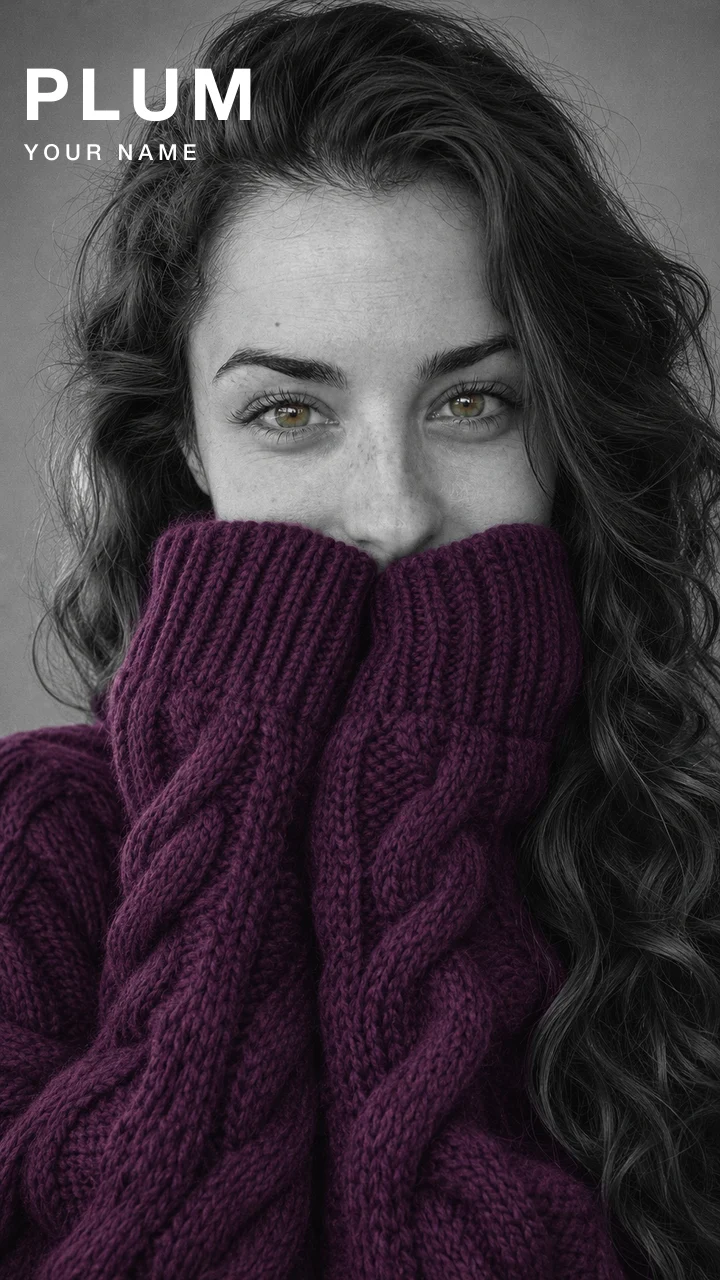
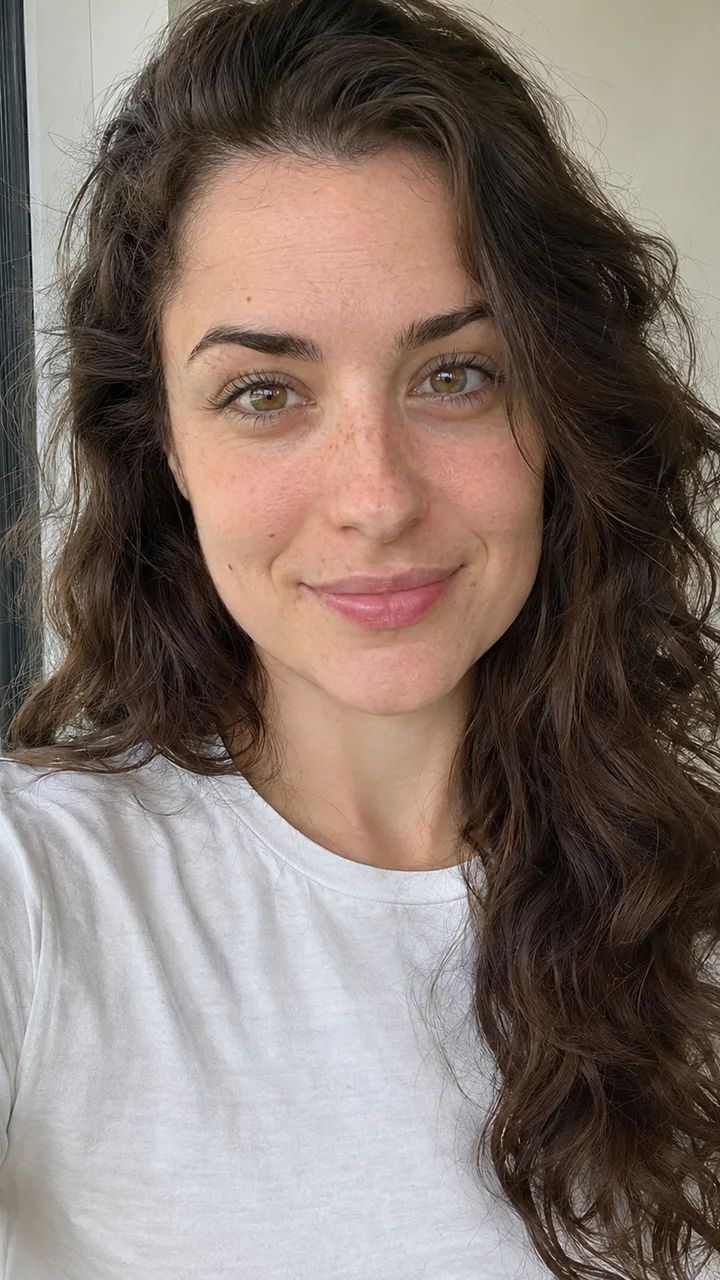
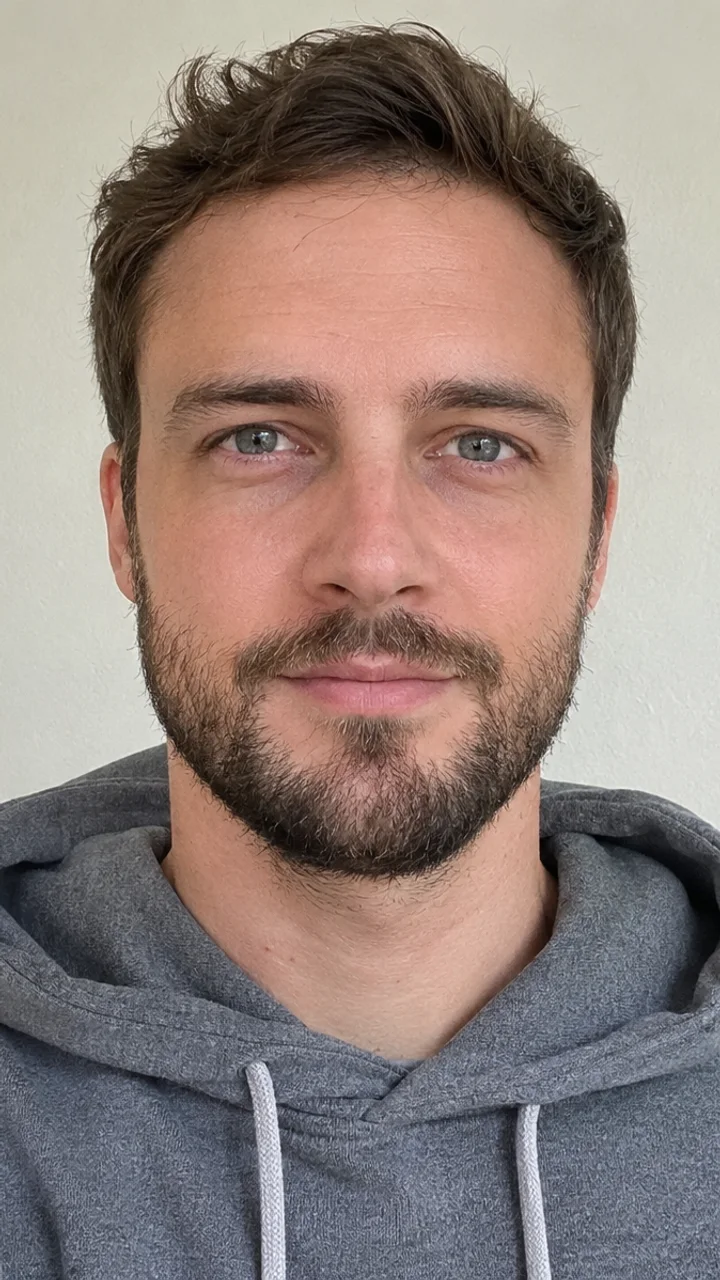
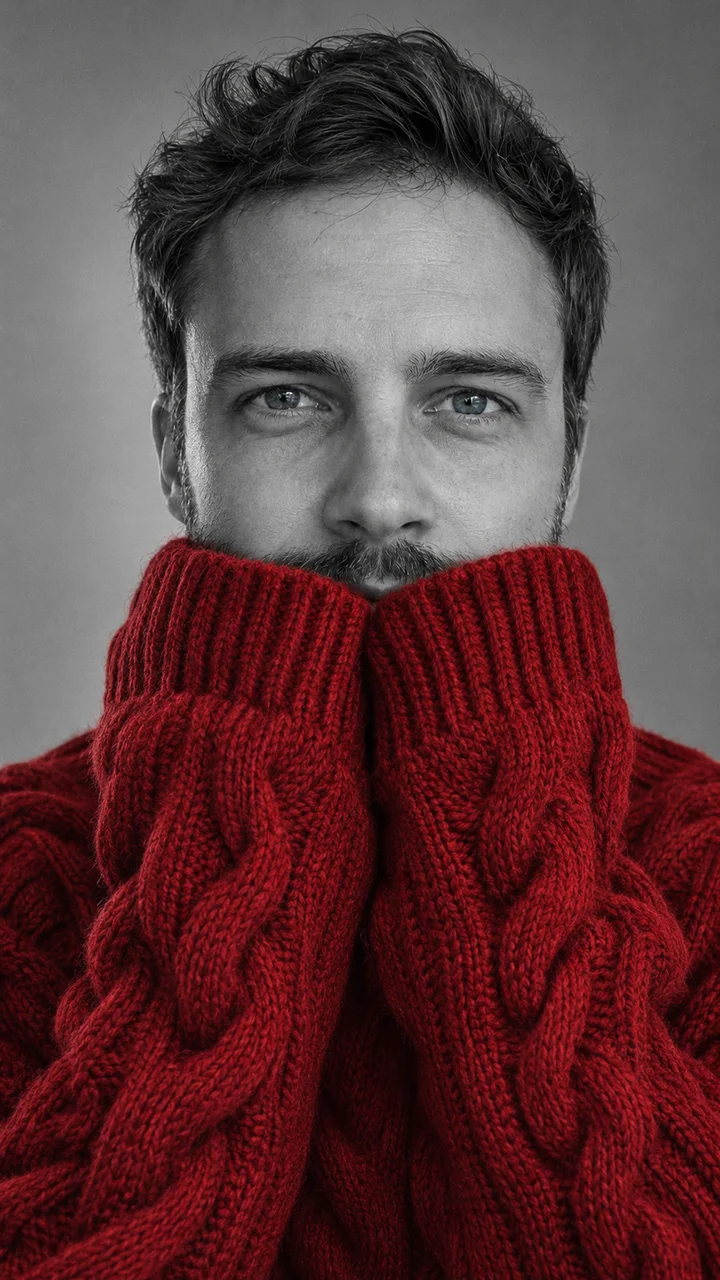
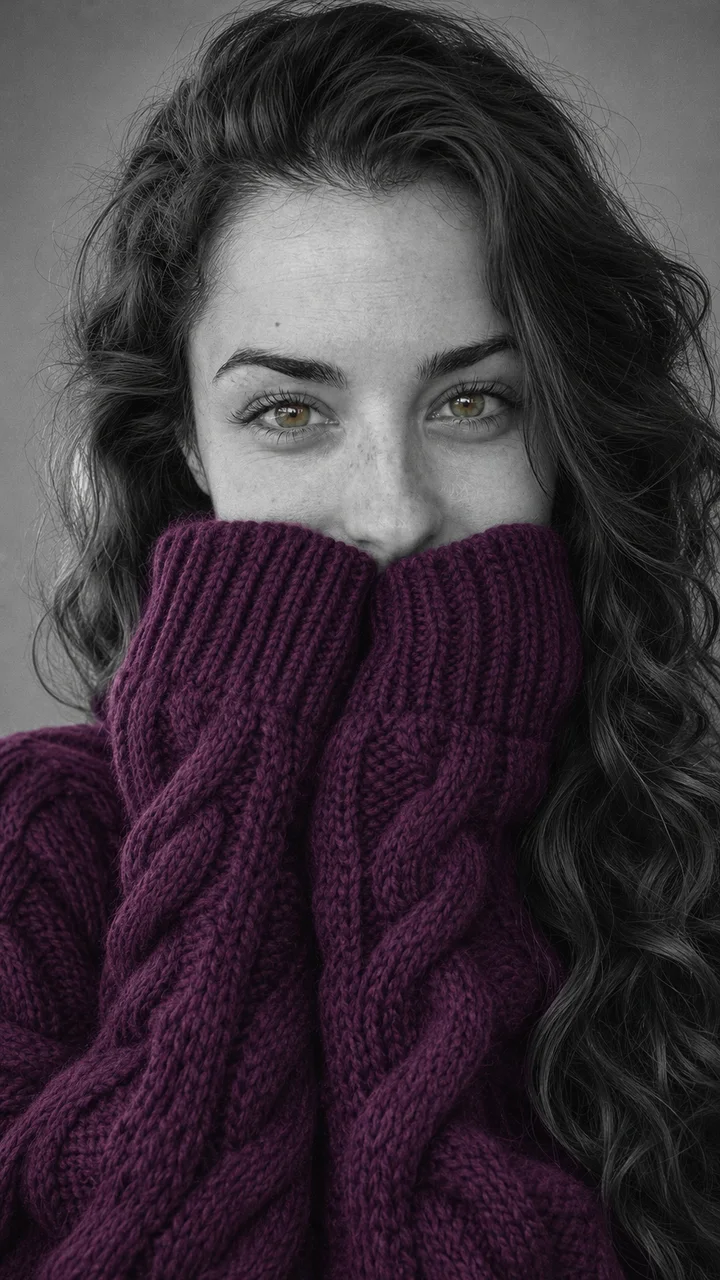
A woman in a white t-shirt becomes a grey studio portrait in a plum sweater, and a bearded man gets cherry red; in both, only the knit and the eyes keep their color.
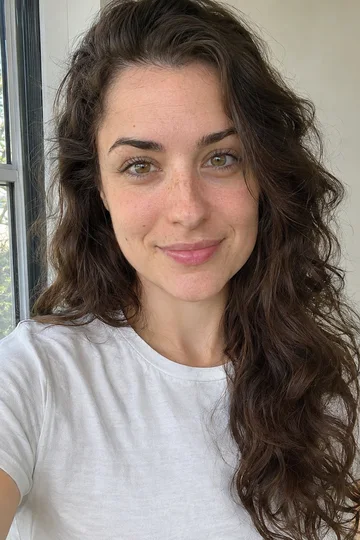
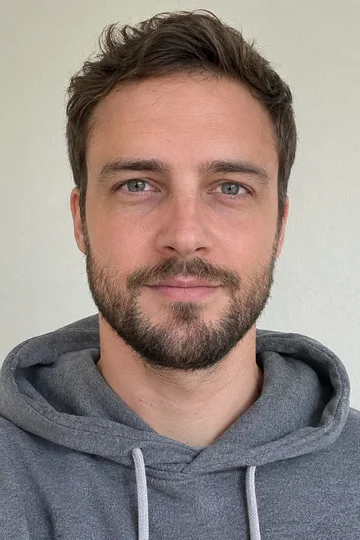
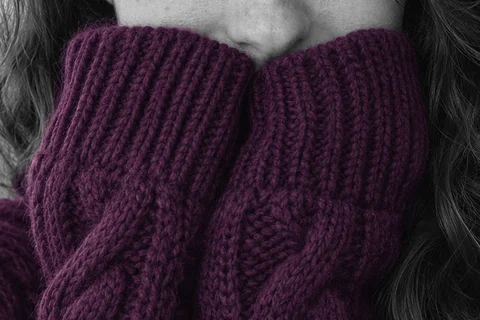
The trend turns one selfie into a black-and-white editorial portrait: an oversized chunky-knit sweater is the only colored thing, the long sleeves are pulled up over the mouth, and the eyes stay in focus with their own color. Both people below are original AI-made adults. Each pair is the photo and the GPT Image 2.5 Flare still made from it on Lovart ME, 9:16. Drag the line on each card to compare.
Plum sleeves · photo on the left, still on the right. Still only · GPT Image 2.5 Flare · 9:16.Use this color →
Cherry red, beard kept · photo on the left, still on the right. Still only · GPT Image 2.5 Flare · 9:16.Use this color →
Plum sleeves · Still only
Photo →Still
Plum sleeves · Still only
New GPT Image 2.5 still · no video
Photo
A GPT Image 2.5 Flare photo of an original adult woman with long dark wavy hair, hazel eyes and freckles, in a plain white t-shirt by a window, chest up, smiling at the camera
Still
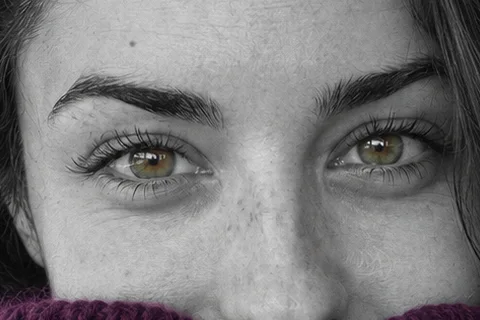
GPT Image 2.5 Flare image to image from that photo, 9:16, made on Lovart ME on November 14, 2026: a grey studio portrait in black and white, a plum cable-knit sweater with both hands hidden in the sleeves, the cuffs stopping just under the tip of the nose; the eyes stay hazel and the freckles stay
A GPT Image 2.5 Flare photo of an original adult man with short brown hair, a trimmed beard and grey-blue eyes, in a grey hoodie against a plain wall, chest up
Still
GPT Image 2.5 Flare image to image from that photo, 9:16, made on Lovart ME on November 14, 2026: black and white on a grey backdrop, a cherry-red cable-knit sweater, the cuffs over the mouth and chin; the moustache and the stubble along the jaw show above the cuffs, and the eyes stay grey-blue
Pick a strong shade: red is the classic, purple has the most liked post, emerald, burgundy and royal blue hold up well, and cream almost disappears in a grey photo.
The color is the one decision in this trend. Everything else in the frame is grey, so the sweater carries the whole picture. The color chips on the workbench change only the color words in the prompt; the pose, the light and the backdrop stay the same.
Strong colors
Cherry red
Red came first in the trend and is the classic. The thumbnail is the Cherry red sample above.
Pink, sage green, mustard and cream also show up in posts of the trend. Cream is the weakest pick: a pale knit reads almost white in a grey photo. These four are not chips on the workbench.
Match your eyes
Some posts match the sweater to the eye color, so the only two colors in the photo are the same. Pick Match my eyes on the workbench and the prompt asks for a sweater in the color of the eyes in your photo.
The sleeves hide your mouth, so the likeness rides on the eyes, brows, nose and hair; a sharp front-facing selfie in daylight keeps them, and a new run fixes eyes that drift.
Keep
What stays
Eye shape and eye color, brows, nose, hairline, hair length, skin tone and age come from your photo. In the plum sample the freckles across the nose and the hazel eyes made it through.
Change
What changes
Your clothes become the chunky sweater, the room becomes a grey studio backdrop, and both hands go inside the sleeves with the cuffs over the mouth. Your smile is under the knit, so it does not count toward the likeness.
Rerun
When the eyes look off
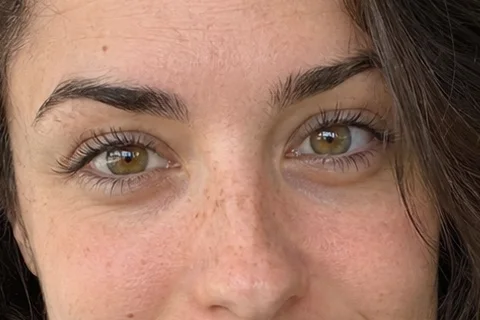
Put the eyes of your still next to your photo, like this crop from the plum photo. If they look like someone else's, use a sharper front-facing selfie with open eyes and press Rebuild still; each run comes out a little different.
The photo matters more here than in most plays, because half the face ends up under the sleeves. Use one person from the chest up, looking into the camera, facing a window in daylight, eyes open and sharp, with no sunglasses and no hand over the face: the model has to see the whole face before the cuffs cover the mouth. Hair, beard and skin texture follow the photo. A beard stays partly visible, as in Cherry red, beard kept, where the moustache shows above the cuffs.
Make my portrait sends your selfie as the reference image to Image to Image, the same tool that takes up to 16 reference pictures in one request; this play uses one.
Keep the face, hair, age, skin tone and eye color from the photo; make the frame black and white with one oversized chunky sweater in your color, cuffs up to just under the nose.
The full prompt
Still
Keep the person's face, eye shape, eye color, brows, nose, hairline, hairstyle, hair length, skin tone and age exactly as in the reference. A black-and-white high-fashion studio beauty portrait, chest up, plain soft grey backdrop, one soft key light from the side, fine film grain, natural skin texture. Only one thing is in color: an oversized chunky cable-knit sweater in deep plum purple with extra-long thick sleeves. Both hands are raised to the face inside the sleeves, the cuffs cover the mouth and chin and stop just under the nose, no fingers showing. The eyes look straight into the lens in sharp focus and keep their natural color. Skin, hair, lips and background stay black and white. Vertical 9:16. No text, no logos, no real celebrities.
This is our own wording, not the caption from the TikTok posts. It is the Plum prompt; the plum sample was made with it, with “hazel” written in place of “their natural color”. The other chips swap “deep plum purple” for their color, and the workbench adds two lines: a beard stays as in your photo, partly under the cuffs, and a dog or cat gets a small sweater with its front paws in the cuffs. You can paste it into ChatGPT or another image tool with your selfie, or run it here from the workbench in one step.
Lines that stop color leaks
The usual flaws are color slipping into lipstick or a necklace, fingers going wrong under the big sleeves, and sleeves covering more than the mouth. Three lines in the prompt guard against them: “Only one thing is in color”, “Skin, hair, lips and background stay black and white”, and “the cuffs cover the mouth and chin and stop just under the nose, no fingers showing”. If a leak still shows, press Rebuild still; each fix is a new run.
Can the ChatGPT sweater portrait become a post cover?
Yes. Open the still in PhotoCraft, set a short line such as the color name above the shoulder, and export it as the cover; to add motion, take it to Image to Video afterwards.
1
Press Download still under your portrait, then Open in PhotoCraft.
2
Add one short line, such as the color name, and keep it off the eyes.
3
Export it and use it as the cover of your post.
Cover text
The plum still with the color name top left over the grey backdrop and a name line under it, clear of the eyes. Still only · GPT Image 2.5 Flare still, type set on top.
Optional motion
The portrait is one still photo, not a video. To make it move, take the still to Image to Video afterwards; that is a separate step with its own price, shown on its button.
PhotoCraft is a free editor for type and layout on a generated image.
No. It is a prompt people share and paste into ChatGPT. Any image tool that keeps a face from a reference photo can make it, including the workbench on this page, which runs it from your selfie in one step.
Where did the AI sweater trend start?
On TikTok in November 2026. The earliest post with the full prompt we found went up on November 9, and the #aisweatertrend hashtag showed up on November 11, per peer pages.
Why are my eyes still in color?
The prompt keeps your natural eye color, so in the finished photo the sweater and your eyes are the only color. In the samples the hazel and the grey-blue eyes come straight from the photos.
Can I do the sweater portrait with my dog or cat?
Yes, the trend has a pet version. Use a photo of the head and chest with both eyes in view; the pet gets a little chunky sweater with its front paws in the cuffs.
How many credits does chatgpt sweater portrait cost on Lovart ME?
Each designed still or frame uses 3 credits. The 5-second clip uses 20 credits in Fast mode (Seedance 2.0 Mini, 480p) or 140 credits in High quality mode (Seedance 2.5, 480p). Credits come in one-time packs, not a subscription: the smallest is $9.90 for 250 credits. Purchased credits do not expire, and a failed generation returns its credits automatically.
Source: MakeViral ChatGPT sweater portrait trend (checked November 14, 2026). People also search chatgpt sweater trend, ai sweater trend, chatgpt sweater prompt and pop of color sweater portrait.
Lovart ME is an independent site and is not affiliated with OpenAI, ChatGPT, TikTok or MakeViral; ChatGPT is named because people search for the trend by that name. Both people in the samples are original AI-made adults, and no TikTok photos are used.
 Plum sleeves · Still only