Parameters Configuration
3

Preview & Examples

Live Preview

Your generated image will appear here

Configure parameters and click Generate

Split Reality - Real to Cartoon Portrait AI Image Generator

What is a Split Reality Portrait Generator?

A split reality portrait generator is an AI-powered tool that divides your photo into two distinct visual styles within one image—typically half realistic, half cartoon. Lovart ME's real to cartoon portrait converter analyzes your facial features and creates a seamless split face portrait where one side maintains photographic realism while the other transforms into stylized cartoon art. This dual style portrait generator preserves your exact identity across both halves, creating that striking split effect you see trending across social media. The AI half realistic half cartoon photo technology ensures smooth transitions without awkward boundaries, giving you professional-quality results that blend reality with artistic interpretation perfectly.

Key Features of Our Split Reality Portrait Generator

Perfect Identity Preservation

Our dual style portrait generator maintains exact facial proportions, features, and identity across both realistic and cartoon halves. Your split reality portrait looks unmistakably like you, just rendered in two different artistic styles.

Seamless Split Transition

The real to cartoon portrait converter creates smooth visual boundaries where realism meets illustration. No awkward distortions or jarring breaks—just clean, professional split face portrait composition throughout.

Customizable Style Intensity

Adjust how cartoonish or illustrated your AI half realistic half cartoon photo appears. Control color saturation, line weight, and artistic interpretation while keeping the realistic half true to your original image.

One-Click Transformation

Upload your portrait and watch Lovart ME's split reality portrait generator work instantly. The cartoon portrait from photo process completes in seconds, creating professional dual-style artwork without manual editing.

Multiple Cartoon Styles

Choose from anime-inspired looks, classic cartoon aesthetics, or modern illustration styles. Our split face portrait creator adapts to different artistic preferences while maintaining character consistency across both halves.

Online Split Reality Portrait Generator

Create your split reality portraits entirely online with Lovart ME's browser-based real to cartoon portrait converter. No Photoshop required, no complex software downloads, no expensive illustration apps. Access professional dual style portrait generation instantly from any device with internet. The AI half realistic half cartoon photo technology runs completely online, so you can transform portraits on desktop, tablet, or mobile. Just upload your photo and let the split face portrait creator handle the artistic magic in real-time.

Split Reality Portrait Generator Showcase
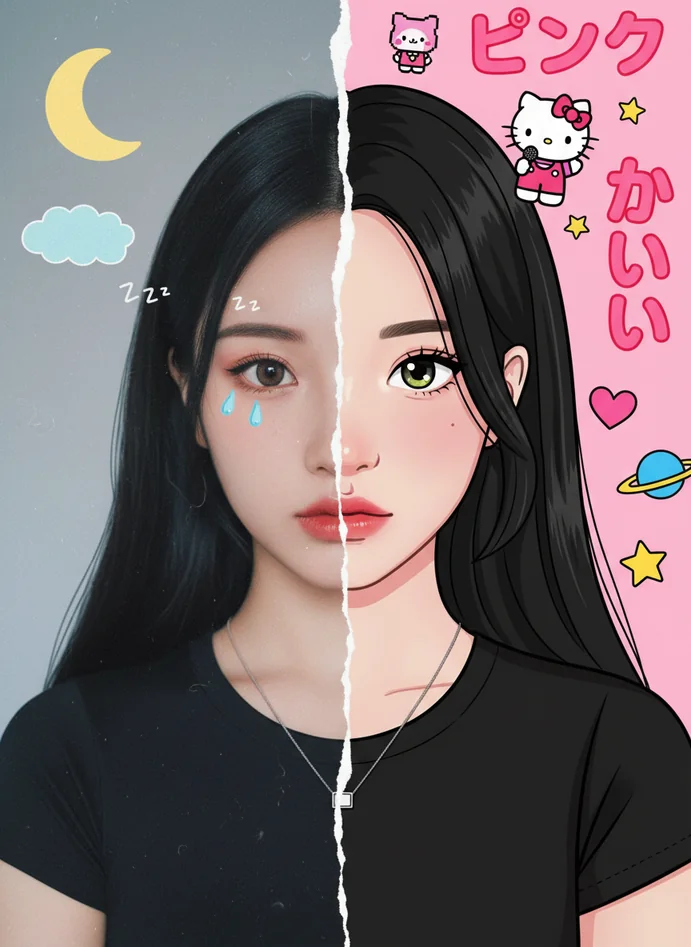
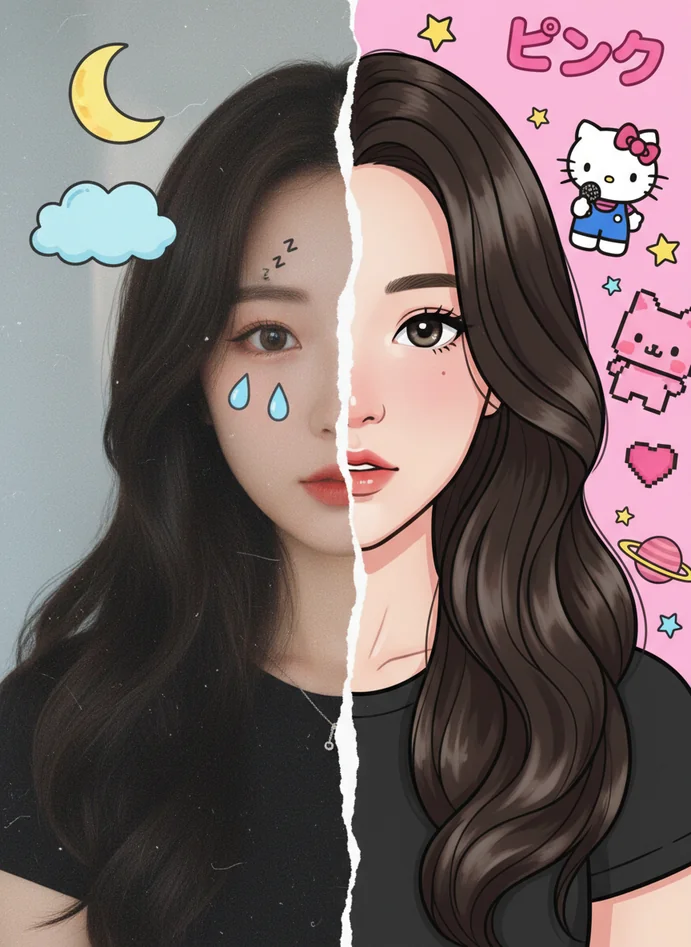
Classic Anime Split Style

Classic Anime Split Style

Photorealistic left side transitions into vibrant anime artwork on the right. Bold colors, characteristic large eyes, and clean linework define this popular split reality portrait aesthetic.
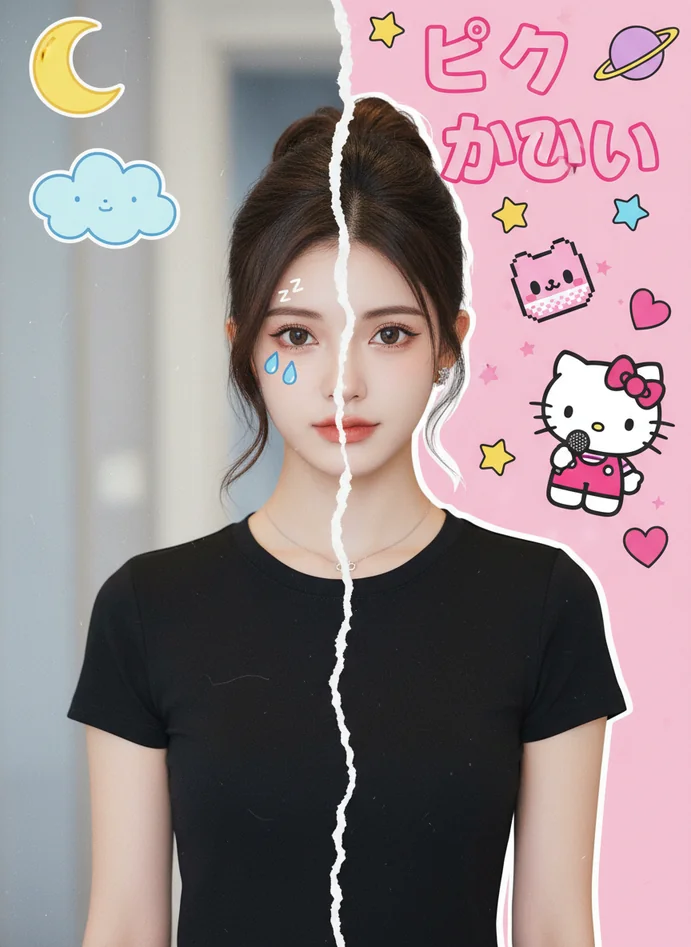
3D Cartoon Hybrid Portrait

3D Cartoon Hybrid Portrait

Real photograph blends into Pixar-style 3D cartoon rendering. The dual style portrait generator captures personality in both photographic and animated forms beautifully.
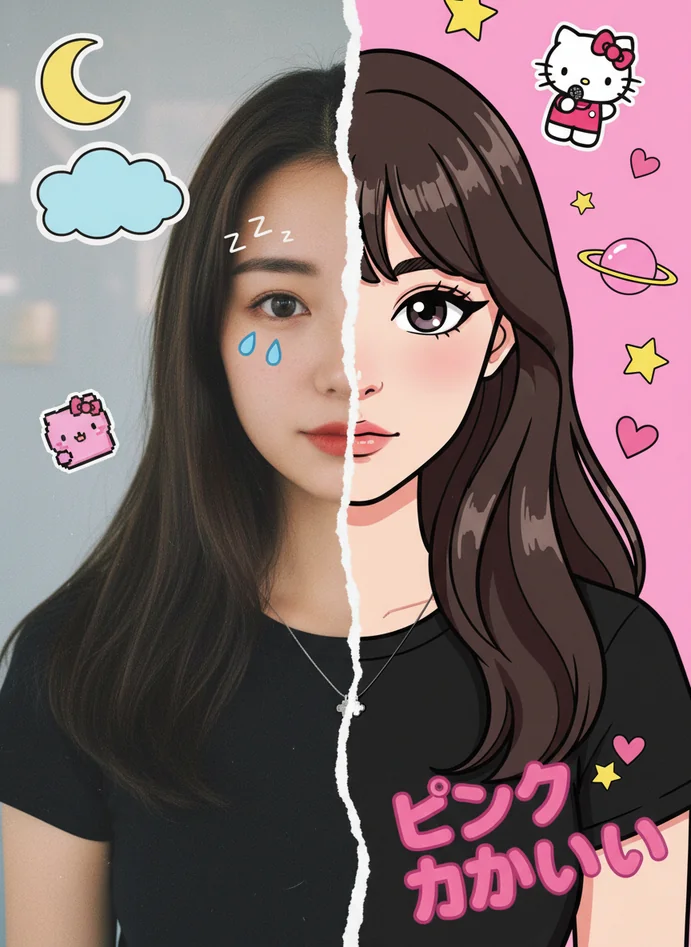
Watercolor Illustration Split

Watercolor Illustration Split

Professional headshot transitions into soft watercolor portrait painting. This real to cartoon portrait converter style works perfectly for artistic social media profiles and creative branding.
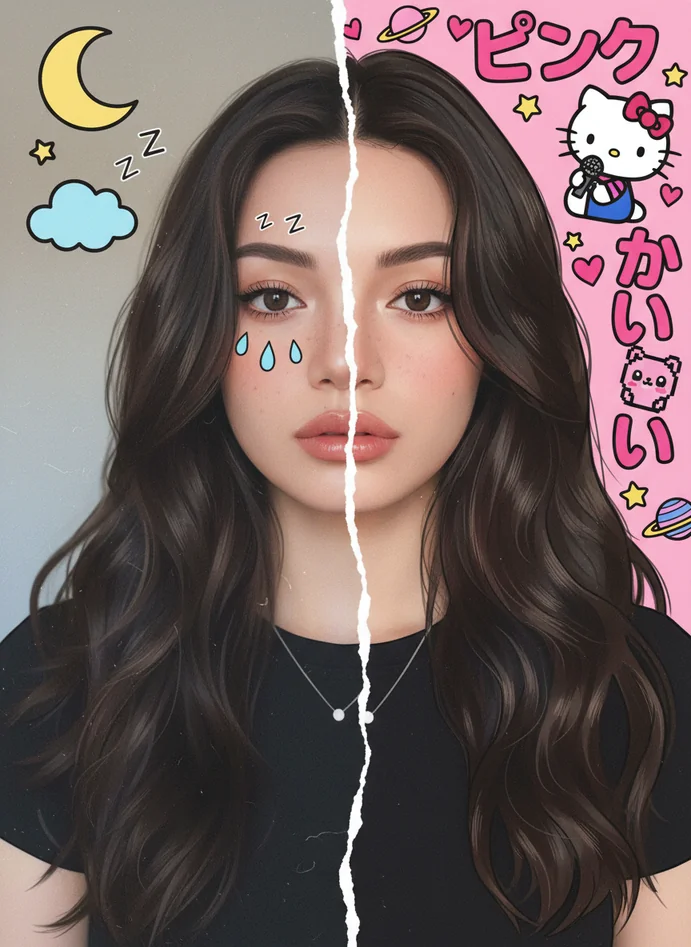
Comic Book Hero Effect

Comic Book Hero Effect

Reality meets comic book art in this bold split face portrait. Strong outlines, halftone shading, and vibrant colors create that authentic superhero comic aesthetic.
Minimalist Line Art Split

Minimalist Line Art Split

Photograph fades into clean, minimalist line drawing. Simple yet striking, this AI half realistic half cartoon photo style emphasizes facial structure through elegant simplification.

Innovations in Split Reality Portrait Technology

Boundary-Aware AI Processing

Advanced algorithms detect facial midline and create mathematically precise splits. Our split reality portrait generator ensures the division line runs exactly where it should, maintaining facial symmetry perfectly.

Style-Consistent Feature Mapping

The real to cartoon portrait converter maps identical facial landmarks across both styles. Eyes, nose, mouth align perfectly between realistic and cartoon halves, preserving your recognizable features throughout.

Adaptive Artistic Rendering

AI analyzes your photo's lighting, shadows, and depth to inform cartoon stylization. This creates dual style portraits where both halves feel cohesive despite different artistic approaches.

Real-Time Split Preview

See your split face portrait come together instantly as the AI processes. Adjust settings and watch the cartoon portrait from photo transformation update live before finalizing your creation.

Techniques Behind Split Reality Portrait Generation

Facial Landmark Detection

AI identifies key facial features and proportions to maintain identity consistency. The split reality portrait generator maps these landmarks identically across realistic and cartoon halves.

Style Transfer Neural Networks

Deep learning models apply cartoon artistic styles while preserving facial structure. This real to cartoon portrait converter technology ensures recognizable features survive stylization processes.

Edge-Preserving Smoothing

Algorithms create clean split boundaries without color bleeding or distortion. Your AI half realistic half cartoon photo maintains crisp separation between the two visual styles.

Proportional Scaling Consistency

Both portrait halves maintain identical facial proportions and sizing. The dual style portrait generator prevents one side from appearing stretched, compressed, or misaligned.

Color Harmony Balancing

AI adjusts cartoon side colors to complement realistic photography tones. This creates split face portraits that feel visually unified despite contrasting artistic approaches.

Detail-Aware Simplification

The cartoon side intelligently simplifies features while keeping recognition high. Important details like unique facial characteristics survive the cartoon portrait from photo transformation process.

Applications for Split Reality Portraits

Social Media Profiles

Stand out on Instagram, TikTok, and Twitter with unique split reality portrait profile pictures. The dual style effect catches attention and showcases creative personality instantly.

Personal Branding

Artists, designers, and creatives use split face portraits to demonstrate versatility. Show both professional photographic presence and artistic illustration skills in one image.

Content Creator Thumbnails

YouTubers and streamers create eye-catching video thumbnails with real to cartoon portrait effects. The split reality style makes content more clickable and memorable.

Digital Art Projects

Incorporate AI half realistic half cartoon photos into larger creative works. Use split portraits as elements in posters, album covers, or multimedia art installations.

Character Design Reference

Artists use split reality portraits to visualize realistic character references alongside stylized interpretations. Perfect for developing consistent character designs across different art styles.

Before-After Comparisons

Demonstrate artistic transformation capabilities by showing photo-to-illustration progression. The split face format makes the comparison immediate and visually powerful.

Personalized Gifts

Create unique artwork for friends and family combining their real photo with custom cartoon interpretations. Print split reality portraits on canvases, posters, or phone cases for memorable presents.

Split Reality Portrait Generator FAQs

What is a split reality portrait?
A split reality portrait is a creative image where your face is divided into two distinct visual styles—typically one half showing photographic realism and the other half displaying cartoon or illustrated artwork. Lovart ME's split reality portrait generator creates this effect by analyzing your facial features and applying different artistic rendering to each side while maintaining perfect identity consistency. The result is a striking dual-style image where both halves are unmistakably you, just represented through different artistic lenses.
How does the real to cartoon portrait converter work?
The real to cartoon portrait converter uses AI to detect your facial landmarks, identify the central division line, and apply artistic stylization to one half while preserving photographic realism on the other. Advanced neural networks map your facial proportions identically across both styles, ensuring eyes, nose, mouth, and other features align perfectly at the split. The AI analyzes lighting, shadows, and depth in your original photo to inform how the cartoon side should be rendered for maximum visual cohesion.
Will my face look identical on both sides?
Absolutely. The split face portrait creator preserves your exact facial structure, proportions, and identifying features across both realistic and cartoon halves. While the artistic rendering differs dramatically, the underlying facial geometry remains identical. Your eyes stay the same distance apart, your nose maintains the same shape, and your smile appears consistent—just depicted through photographic versus illustrated artistic styles. This identity preservation is what makes split reality portraits so visually compelling.
What photo works best for split reality portraits?
Use a clear, front-facing portrait photo with good lighting where your face is directly toward the camera. Avoid extreme angles, heavy shadows, or photos where you're looking sideways. The dual style portrait generator works best when your face is centered and fully visible. Indoor or outdoor lighting both work fine as long as facial features are clearly distinguishable. Remove sunglasses or hats that obscure facial landmarks for best results with the AI half realistic half cartoon photo process.
Can I choose which side becomes cartoon?
Most split reality portrait generators follow a standard division, but Lovart ME allows customization of which half receives cartoon treatment. You can flip the orientation so the illustrated style appears on your preferred side. Some users prefer cartoon-left for visual flow reasons, while others choose cartoon-right. The split face portrait creator maintains the same quality and identity preservation regardless of which configuration you select.
What cartoon styles are available?
Our real to cartoon portrait converter offers multiple artistic styles including anime aesthetics, classic Disney-style animation, Pixar-inspired 3D cartoon looks, comic book illustration, watercolor painting, minimalist line art, and manga-style rendering. Each style maintains your facial identity while applying different artistic conventions like line weight, color saturation, shading techniques, and feature simplification levels. Experiment with various options to find which cartoon portrait from photo style matches your creative vision best.
How long does split reality portrait generation take?
The AI half realistic half cartoon photo process typically completes in 15-45 seconds depending on image resolution and server load. Lovart ME's split reality portrait generator processes your upload, analyzes facial features, creates the split boundary, applies artistic styling, and renders the final image all within under a minute. More complex cartoon styles with detailed shading may take slightly longer, but you'll see real-time preview updates as the dual style portrait develops.
Can I adjust the split boundary position?
Yes, advanced options let you shift the division line left or right from center. While most split face portraits work best with a straight vertical midline division, some facial features or compositions benefit from slightly off-center splits. The split reality portrait generator detects optimal placement automatically but allows manual adjustment if you want the boundary to favor one side or avoid bisecting specific facial features awkwardly.
Will the colors match between both sides?
The real to cartoon portrait converter intelligently harmonizes colors across the split. While the cartoon side may feature more saturated or stylized tones, the AI ensures overall color temperature and palette feel cohesive. If your realistic half shows warm skin tones, the cartoon half will reflect that warmth in its stylization. This color consistency prevents the two halves from feeling disconnected or mismatched despite their different artistic approaches.
Can I create split reality portraits of other people?
You can upload photos of anyone with their permission. The dual style portrait generator works equally well on all ages, genders, and ethnicities. Some users create split face portraits of family members, friends, or even pets. Just ensure you have rights to use the photo and permission from the subject if you plan to share the resulting AI half realistic half cartoon photo publicly on social media or other platforms.
What resolution are the final split reality portraits?
Lovart ME's split reality portrait generator produces high-resolution output suitable for both digital sharing and physical printing. Final images typically match or exceed your upload resolution, with maximum outputs reaching 2048x2048 pixels or higher. This resolution works perfectly for social media profile pictures, YouTube thumbnails, and even printing on canvases up to 16x20 inches. Download options include web-optimized and print-quality versions.
Do I need design skills to use this tool?
Not at all. The real to cartoon portrait converter handles all artistic decisions automatically. You just upload a photo, select your preferred cartoon style, and let the AI create your split face portrait. No Photoshop knowledge, no illustration experience, no technical skills required. The split reality portrait generator is designed for everyone—from complete beginners to professional artists looking to speed up their creative workflow.
Can I use split reality portraits commercially?
Yes, you retain full commercial rights to split reality portraits created with Lovart ME. Use your dual style portraits in marketing materials, merchandise, client projects, or commercial artwork without additional licensing. This makes the split face portrait creator valuable for businesses, content creators, and professional artists who need unique visual content for commercial purposes. Just ensure you own rights to the original uploaded photo.
How does this compare to manual illustration?
Manual illustration by professional artists can take hours or days and cost hundreds of dollars. Our AI half realistic half cartoon photo generator delivers comparable results in seconds for a fraction of the cost. While human artists offer unlimited creative control, the split reality portrait generator provides instant gratification and consistency that manual methods can't match. Many artists actually use our tool to create base references they then refine manually.
Can I create variations of the same split portrait?
Absolutely. Upload the same photo multiple times and experiment with different cartoon styles, color adjustments, or split orientations. The real to cartoon portrait converter lets you generate countless variations exploring different artistic interpretations. Save your favorites and compare how anime styling versus comic book aesthetics versus watercolor illustration each transforms your portrait. This variation capability makes the tool perfect for finding exactly the right look for your specific project.