Parameters Configuration
3

Preview & Examples

Live Preview

Your generated image will appear here

Configure parameters and click Generate

ID Photo Generator AI Image Generator

What is an ID Photo Generator?

An ID photo generator transforms ordinary snapshots into regulation-compliant identification photos that government agencies actually accept. This AI passport photo maker uses intelligent AI Generation technology to handle background replacement, facial positioning, and format compliance automatically—no photo studio visits required. Our professional ID photo editor analyzes your uploaded image using AI generation templates to ensure proper head sizing, neutral expressions, and centered alignment that meets international biometric standards. The ID photo generator powered by AI Image Generation delivers passport photos, visa photos, and license photos that match official requirements for 100+ countries. With Lovart ME's AI passport photo maker handling the technical specifications through advanced AI Generation, you're getting professional ID photos from your phone camera that pass government inspection. This professional ID photo editor uses AI generation templates trained on official biometric standards, so the ID photo generator produces compliant results without requiring photography expertise.

Key Features of Our ID Photo Generator

Instant Background Replacement with AI

The AI passport photo maker automatically detects and removes your original background using AI Generation, replacing it with regulation-compliant solid colors—white, blue, grey—required by different countries. This ID photo generator feature in the professional ID photo editor uses AI Image Generation to create studio-quality backgrounds without green screens.

Biometric Compliance Verification

Our ID photo generator checks every photo against international biometric standards using AI generation templates before you download. The AI passport photo maker validates head size ratios, eye positioning, facial alignment, and expression neutrality with professional ID photo editor precision powered by AI Generation technology.

Multi-Country Format Support

Generate ID photos for 100+ countries with the professional ID photo editor. Whether you need US passport dimensions (2×2 inches), Schengen visa specs (35×45mm), or Chinese ID format, this AI passport photo maker automatically adjusts sizing using AI generation templates. The ID photo generator knows exact requirements for every major document type with AI Image Generation.

Facial Feature Preservation

The ID photo generator using AI Generation maintains your authentic appearance while optimizing for official requirements. This AI passport photo maker doesn't artificially alter your facial structure—the professional ID photo editor applies only minimal adjustments for professional presentation using AI generation templates while keeping you recognizable for biometric verification.

Print-Ready and Digital Export

Download high-resolution files optimized for both professional printing and digital submission with the ID photo generator. The AI passport photo maker provides 300+ DPI quality for physical prints and properly formatted files for online government portals using AI Image Generation. This professional ID photo editor ensures your ID photos work everywhere with AI Generation technology.

Online ID Photo Generator - No Downloads Required

Create compliant ID photos directly in your browser with this online ID photo generator from Lovart ME. No software installation needed for this AI passport photo maker to work—just upload your photo and select your document type. Our professional ID photo editor uses AI generation templates accessible instantly from any device, whether you're applying for a passport at home or processing visa photos on your phone. The ID photo generator with AI Generation technology handles complex biometric calculations in real-time through your browser. This AI passport photo maker delivers professional ID photo editor quality without downloading apps or software, powered by AI Image Generation that runs entirely online.

ID Photo Generator Showcase Gallery
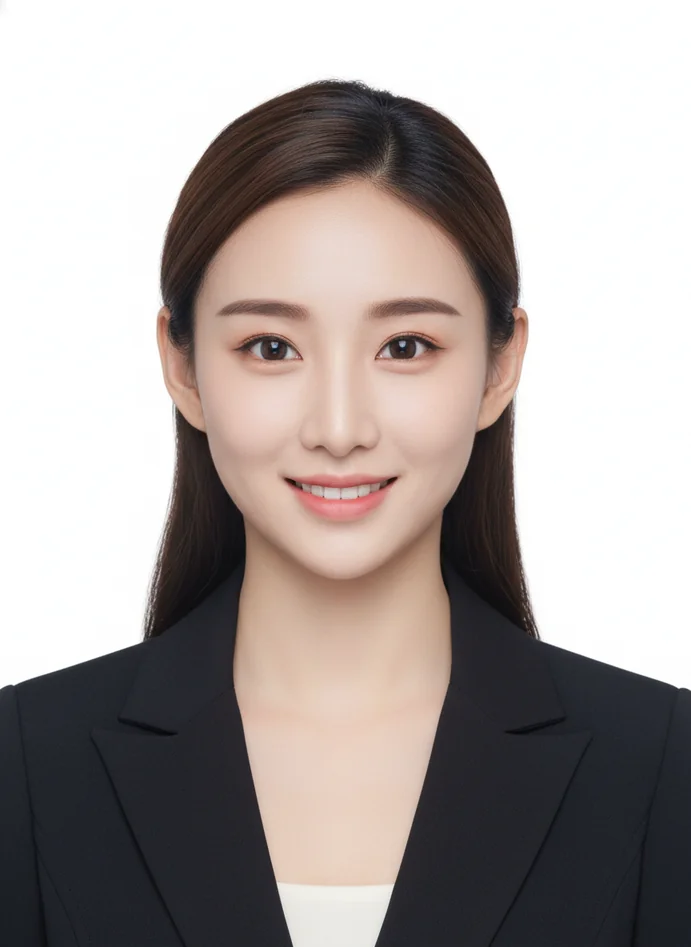
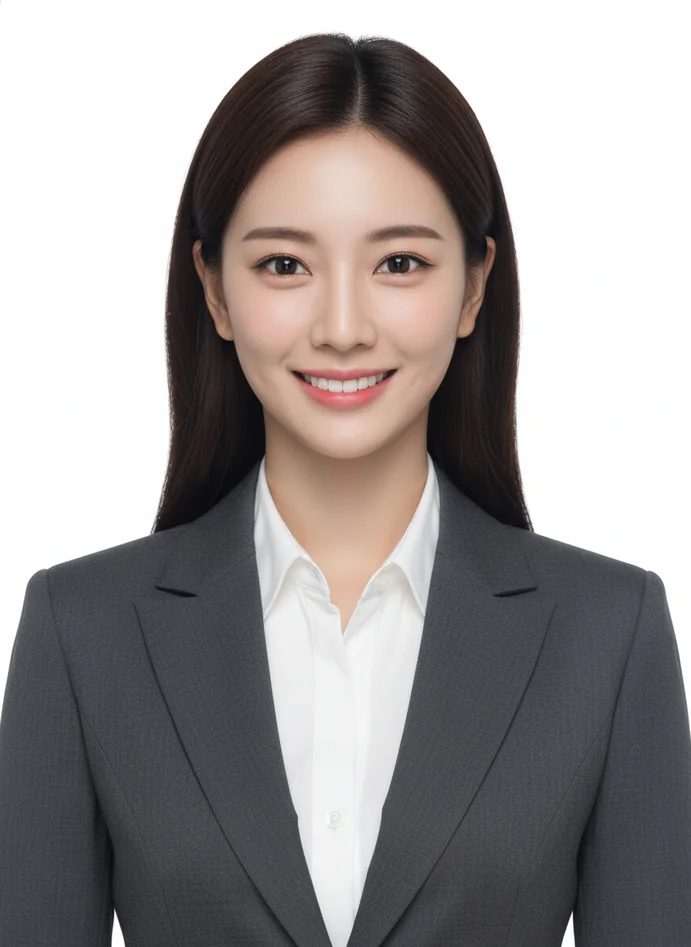
US Passport Photo with White Background

US Passport Photo with White Background

Standard US passport photo generated by our ID photo generator with precise 2×2 inch dimensions, clean white background, and proper head positioning. This AI passport photo maker example meets State Department requirements using the professional ID photo editor with AI Generation.
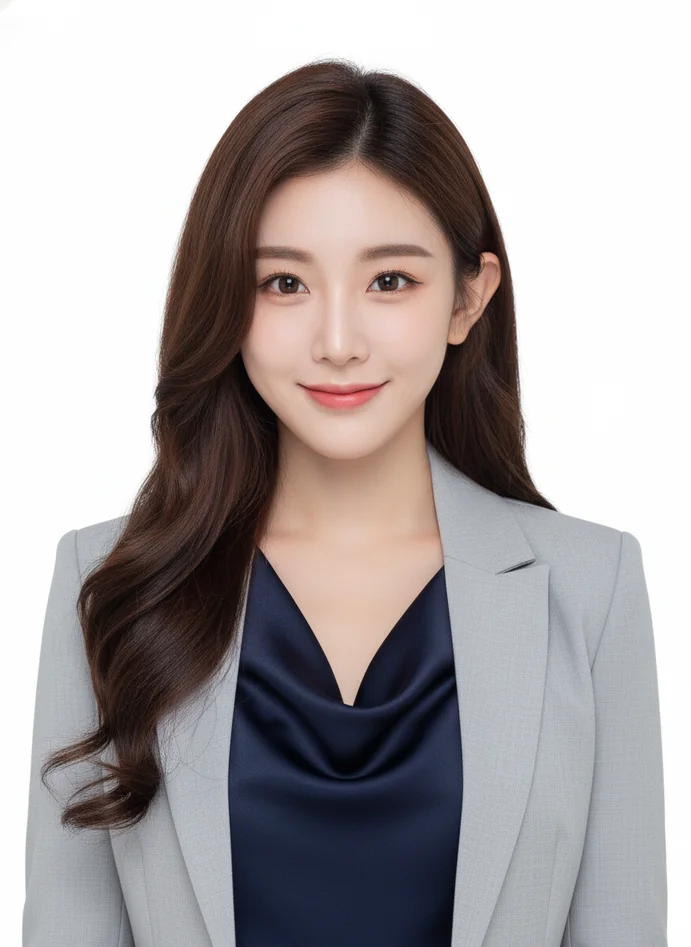
Schengen Visa Photo Compliance

Schengen Visa Photo Compliance

Professional visa photo at 35×45mm created with the AI passport photo maker showing neutral expression and centered alignment. This ID photo generator output demonstrates the professional ID photo editor's accuracy with AI generation templates for European visa applications.
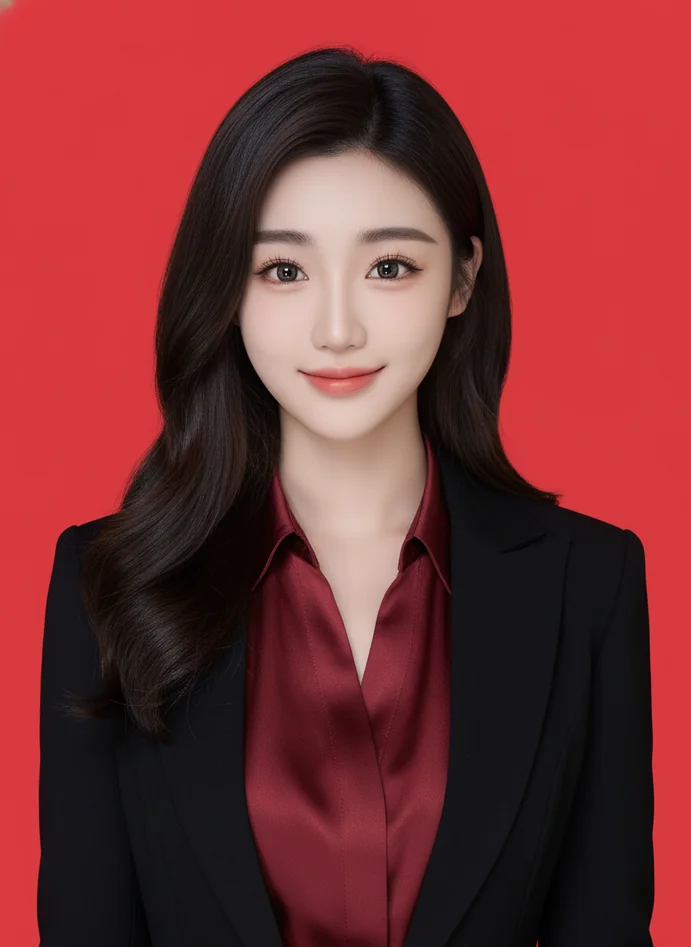
Chinese Visa Blue Background Format

Chinese Visa Blue Background Format

Official Chinese visa photo with regulation blue background generated by the professional ID photo editor. This AI passport photo maker result shows the ID photo generator's ability to match specific country requirements using AI Image Generation technology.
Driver's License Photo Example

Driver's License Photo Example

Clean driver's license photo created with our ID photo generator featuring proper facial centering and neutral background. The AI passport photo maker handles state-specific DMV requirements through the professional ID photo editor using AI Generation.

Advanced AI Passport Photo Maker Innovations

Intelligent Facial Landmark Detection

The ID photo generator in our AI passport photo maker uses advanced computer vision to identify 68 facial landmarks for precise positioning using AI Generation. This professional ID photo editor analyzes eye level, nose position, and chin alignment to ensure your photo meets biometric standards with AI generation templates, automatically adjusting composition for optimal compliance in every ID photo generator output.

Adaptive Background Lighting Simulation

AI Generation in this AI passport photo maker doesn't just replace backgrounds—it simulates professional studio lighting conditions around your face. The ID photo generator's professional ID photo editor analyzes your original lighting using AI Image Generation, then adds subtle shadows and highlights that make the background replacement look natural rather than digitally pasted, ensuring government reviewers accept ID photos from this AI passport photo maker.

Real-Time Compliance Validation Engine

Before you download from the ID photo generator, the AI passport photo maker checks your photo against official requirements using AI generation templates: head size percentage, eye-level positioning, facial symmetry, expression neutrality, and resolution standards. This professional ID photo editor provides instant feedback with AI Generation if adjustments are needed, preventing rejection before submission from Lovart ME's ID photo generator.

Multi-Document Batch Processing

The professional ID photo editor in our AI passport photo maker can process multiple family members' photos simultaneously with the ID photo generator using AI Image Generation. Upload several portraits, select different document types for each person with AI generation templates, and the ID photo generator produces correctly formatted ID photos for everyone in one session using AI Generation technology from this AI passport photo maker.

Professional ID Photo Creation Techniques

Biometric Head Ratio Optimization

The ID photo generator using AI Generation ensures your head occupies 50-70% of frame height—the international standard for machine-readable documents. This AI passport photo maker technique in the professional ID photo editor measures facial dimensions from crown to chin using AI generation templates, then crops precisely so your ID photos meet ICAO biometric standards with AI Image Generation.

Neutral Expression Verification

Official ID photos from the AI passport photo maker require neutral facial expressions for biometric matching. The professional ID photo editor in this ID photo generator uses AI Generation to analyze mouth position, eye openness, and facial tension with AI generation templates, providing guidance if your expression reads as smiling, frowning, or tense. This ensures ID photos from the AI passport photo maker pass government facial recognition systems.

Shadow Elimination Processing

Background shadows cause ID photo rejections frequently. The ID photo generator's AI passport photo maker uses AI Image Generation to detect and remove shadows behind your head in the professional ID photo editor, replacing them with evenly lit backgrounds using AI Generation. This AI generation template technique ensures clean ID photos that meet no-shadow requirements from immigration and licensing authorities.

Eye-Level Alignment Calibration

International biometric standards require eyes positioned at specific heights within the frame. The professional ID photo editor in our ID photo generator uses AI Generation to detect pupil positions with the AI passport photo maker, then adjusts vertical placement using AI generation templates so eye level meets country-specific requirements. This precision ensures ID photos from Lovart ME's AI passport photo maker pass automated verification systems using AI Image Generation.

Resolution and Sharpness Enhancement

Government portals require specific pixel dimensions and clarity levels. The ID photo generator with AI passport photo maker technology upscales lower-resolution photos using AI Generation while maintaining facial detail in the professional ID photo editor. This AI Image Generation technique produces print-ready ID photos at 300+ DPI from the AI passport photo maker using AI generation templates, meeting technical submission requirements without artifacting.

Practical Uses for Our ID Photo Generator

Passport Applications and Renewals

Apply for new passports or renew existing ones using ID photos from the AI passport photo maker without visiting a photo studio. The ID photo generator with professional ID photo editor ensures your photos meet State Department, UK Passport Office, or equivalent agency requirements using AI Generation. Generate compliant passport photos at home with this AI passport photo maker using AI generation templates and AI Image Generation from Lovart ME.

Visa Photo Requirements

Different countries demand specific visa photo formats—Schengen visas, Chinese visas, Indian e-visas each have unique specifications. The professional ID photo editor in our ID photo generator knows exact requirements for 100+ countries with the AI passport photo maker. Create properly formatted visa photos using AI generation templates with AI Generation technology, eliminating visa application photo rejections through this AI passport photo maker.

Driver's License Photos

DMV visits often mean long waits just for license photos. Use the ID photo generator as your AI passport photo maker for driver's license renewals or new licenses—upload your photo to the professional ID photo editor, select your state requirements with AI Generation, and get DMV-compliant photos using AI Image Generation. This ID photo generator handles state-specific background colors and sizing with AI generation templates.

National ID Card Documentation

Countries requiring national identification cards have strict photo standards. The AI passport photo maker in our professional ID photo editor generates ID photos meeting local government specifications using the ID photo generator with AI Generation. Whether you need Aadhaar card photos in India or national ID photos elsewhere, this AI passport photo maker produces compliant results using AI generation templates.

Professional License Applications

Medical licenses, legal bar cards, teaching certifications, and professional credentials require official photos. The ID photo generator with AI passport photo maker handles professional licensing photo requirements through the professional ID photo editor using AI Image Generation. Generate professional license photos that meet board standards with AI Generation from this ID photo generator using AI generation templates.

Student ID and University Applications

Universities and schools need properly formatted student ID photos for enrollment systems. Use the professional ID photo editor in our AI passport photo maker to create student ID photos meeting institutional requirements with the ID photo generator. This AI passport photo maker produces photos for university applications, student visas, and campus ID cards using AI Generation and AI generation templates from Lovart ME.

Employment and Background Checks

Job applications, work permits, and employment verification often require official ID photos. The ID photo generator with AI passport photo maker creates professional ID photo editor quality headshots for employment documentation using AI Image Generation. Generate work permit photos, employee badge photos, and background check documentation with this AI passport photo maker using AI generation templates and AI Generation technology.

ID Photo Generator FAQs

What makes an ID photo generator different from regular photo editors?
An ID photo generator doesn't just crop your photo—it's an AI passport photo maker that understands complex biometric regulations across 100+ countries using AI Generation. Regular photo editors make you manually figure out head size ratios, background requirements, and dimension specifications. Our professional ID photo editor automates all technical compliance with AI generation templates: it calculates if your head occupies the correct 50-70% of frame height, verifies eye-level positioning matches international standards, replaces backgrounds with regulation-compliant solid colors using AI Image Generation, and exports in exact dimensions required by different document types. The ID photo generator acts as an AI passport photo maker that knows whether you need 2×2 inches for US passports or 35×45mm for Schengen visas, applying these specifications automatically with AI Generation. Regular editors force you to research and implement these rules manually—our professional ID photo editor does it instantly using AI generation templates trained on official government requirements from Lovart ME's ID photo generator.
Will photos from this AI passport photo maker be accepted by government agencies?
Yes, when you follow the guidelines. The ID photo generator using our professional ID photo editor is designed specifically for official document compliance with AI Generation, checking photos against international biometric standards with AI generation templates before download. Government agencies accept ID photos from this AI passport photo maker because the professional ID photo editor validates head size ratios, eye positioning, neutral expressions, proper lighting, and resolution requirements using AI Image Generation—the same criteria immigration officers and licensing authorities check manually. That said, source photo quality matters for the ID photo generator: upload clear, well-lit portraits facing forward. The AI passport photo maker with AI Generation can't fix severely blurry images or correct extreme angles beyond what the professional ID photo editor's AI generation templates allow. Start with decent smartphone photos in good lighting, let the ID photo generator handle technical specifications using AI Image Generation, and your ID photos from this AI passport photo maker will meet government acceptance standards with AI Generation technology from Lovart ME.
How does the professional ID photo editor handle different country requirements?
The ID photo generator maintains a comprehensive database of official specifications for 100+ countries in the AI passport photo maker using AI generation templates. When you select your document type—US passport, UK visa, Chinese travel document—the professional ID photo editor loads that country's exact requirements using AI Generation: specific dimensions in inches or millimeters with the AI passport photo maker, required background colors from the ID photo generator, head size percentages using AI Image Generation, acceptable facial expressions in the professional ID photo editor, and resolution standards. The AI passport photo maker then applies these rules automatically with AI Generation rather than expecting you to research them. For instance, US passports from the ID photo generator need 2×2 inches with white backgrounds using AI generation templates, while Chinese visas require blue backgrounds at different dimensions from the professional ID photo editor. The AI passport photo maker knows these distinctions with AI Image Generation, adjusting your photo accordingly in the ID photo generator. This database in the professional ID photo editor updates regularly as governments revise standards using AI Generation, ensuring ID photos from Lovart ME's AI passport photo maker stay current with the latest requirements using AI generation templates.
What type of photo should I upload to the ID photo generator?
Upload a clear portrait showing your full face, taken within the last six months for the AI passport photo maker. Best results in the ID photo generator come from photos where you're facing forward with the professional ID photo editor, showing both ears if possible, with neutral expression using AI Generation, in good natural or indoor lighting, against any background—the AI passport photo maker removes it automatically using AI generation templates. Your phone camera works perfectly for this professional ID photo editor; no professional equipment needed for the ID photo generator. Avoid wearing sunglasses, hats, or headphones in photos for the AI passport photo maker, as most countries prohibit accessories using AI Image Generation. You can wear your regular glasses if needed by the professional ID photo editor, though some countries request no glasses—check specific requirements when using the ID photo generator. Don't worry about the background in your source photo for the AI passport photo maker; the professional ID photo editor using AI Generation removes it completely with AI generation templates, replacing it with regulation-compliant solid colors using AI Image Generation. Just ensure your face is clearly visible, well-lit, and centered in frame for the ID photo generator from Lovart ME's AI passport photo maker.
How long does the ID photo generator take to process photos?
Most ID photos from the AI passport photo maker generate in 10-30 seconds after upload using the professional ID photo editor. The ID photo generator processes your image through several AI Generation steps with AI generation templates: facial landmark detection by the AI passport photo maker identifies 68 points on your face in the professional ID photo editor, background removal using AI Image Generation separates you from the original setting, compliance verification in the ID photo generator checks biometric standards, dimension adjustment by the AI passport photo maker resizes to exact specifications using AI Generation, and final export from the professional ID photo editor produces print-ready files. High-resolution outputs for printing from the ID photo generator might take up to 60 seconds depending on your selected quality in the AI passport photo maker with AI generation templates. This speed comes from Lovart ME's optimized AI Image Generation infrastructure in the professional ID photo editor—you're getting compliant ID photos in under a minute using the AI passport photo maker, compared to driving to a photo studio, waiting for service, and driving back with physical prints, which consumes an hour or more for the same result without using this ID photo generator.
Can I use the same photo for multiple document types with the AI passport photo maker?
Absolutely. Upload once to the ID photo generator, then generate versions for different documents using the professional ID photo editor with AI Generation. Your original portrait from the AI passport photo maker can become a US passport photo (2×2 inches, white background) using AI generation templates, a Schengen visa photo (35×45mm, light background) from the ID photo generator with AI Image Generation, a Chinese visa photo (blue background, specific dimensions) using the professional ID photo editor, and a driver's license photo matching your state's requirements with the AI passport photo maker. Each version from the ID photo generator gets formatted independently using AI Generation—the professional ID photo editor adjusts dimensions, background colors, and positioning with AI generation templates to match that specific document's requirements using AI Image Generation. This saves time when applying for multiple documents simultaneously with the AI passport photo maker; you don't need separate photo sessions for each application using the ID photo generator. One good portrait from the professional ID photo editor becomes every official photo you need with AI Generation from Lovart ME's AI passport photo maker.
What backgrounds does the professional ID photo editor support?
The ID photo generator offers all standard official document backgrounds in the AI passport photo maker using AI Generation: pure white (most common for passports) with the professional ID photo editor, light grey (alternative for some visas) using AI generation templates, blue (required for Chinese visas and some Asian countries) from the ID photo generator with AI Image Generation, and custom colors if your institution has specific requirements in the AI passport photo maker. Background selection in the professional ID photo editor happens automatically based on document type using AI Generation—choose US passport in the ID photo generator, get white background from the AI passport photo maker with AI generation templates; select Chinese visa, get regulation blue from the professional ID photo editor using AI Image Generation. The AI passport photo maker uses professional studio lighting simulation with AI Generation so replaced backgrounds in the ID photo generator look natural rather than obviously edited in the professional ID photo editor. Lighting around your face from the AI passport photo maker matches the new background using AI generation templates, eliminating that cut-and-paste appearance amateur editors create. This attention to lighting detail in the ID photo generator using AI Image Generation ensures government reviewers accept photos from Lovart ME's professional ID photo editor as professionally shot rather than home-edited with the AI passport photo maker.
Does the ID photo generator work on mobile devices?
Yes, the AI passport photo maker is fully mobile-optimized in the professional ID photo editor using AI Generation. Access the ID photo generator from your smartphone browser with the AI passport photo maker—no app download required using AI generation templates. Take your photo directly with your phone camera, upload to the professional ID photo editor in the ID photo generator, and download compliant results using AI Image Generation from the AI passport photo maker. The interface in the professional ID photo editor adapts to smaller screens while maintaining full functionality of the ID photo generator using AI Generation. Most users actually prefer mobile for the AI passport photo maker with AI generation templates: take your photo in good natural light from a window, immediately upload to the ID photo generator in Lovart ME's professional ID photo editor, and within seconds you have government-compliant ID photos on your device using AI Image Generation from the AI passport photo maker. This mobile convenience in the ID photo generator means you can apply for urgent visa appointments or last-minute passport renewals using the professional ID photo editor wherever you are, without needing desktop computers or photo studio visits for the AI passport photo maker with AI Generation technology.
What file formats does the AI passport photo maker provide?
Standard downloads from the ID photo generator include JPG for most applications with the professional ID photo editor using AI Generation, PNG for digital submissions requiring transparency support from the AI passport photo maker with AI generation templates, and print-ready PDF containing multiple copies arranged on standard paper sizes from the ID photo generator using AI Image Generation. For digital submissions to government portals in the professional ID photo editor, the AI passport photo maker exports at exact pixel dimensions required—typically 600×600 pixels or similar specifications using AI Generation. For physical printing from the ID photo generator, the professional ID photo editor provides 300+ DPI resolution ensuring sharp, clear prints from the AI passport photo maker with AI generation templates. The PDF template sheets from the ID photo generator arrange 4-8 copies on letter or A4 paper using AI Image Generation, letting you print multiple ID photos from one page with the professional ID photo editor for cost efficiency. Just take the PDF to any drugstore or photo printing service, and you'll get professional prints from Lovart ME's AI passport photo maker optimized for official document use from the ID photo generator using AI Generation.
Can the professional ID photo editor fix lighting problems in my photo?
The ID photo generator with AI passport photo maker can improve lighting using AI Generation, but works best with reasonably well-lit source photos in the professional ID photo editor. If your original image is underexposed (too dark), the AI passport photo maker brightens it using AI generation templates while maintaining natural skin tones in the ID photo generator. Overexposed (too bright) photos get toned down by the professional ID photo editor using AI Image Generation. The ID photo generator using the AI passport photo maker balances uneven lighting—like window light from one side—creating more uniform illumination with AI Generation in the professional ID photo editor. However, extremely dark photos or severe backlighting exceed what the ID photo generator can fix using AI generation templates. The AI passport photo maker isn't creating information that doesn't exist in the professional ID photo editor using AI Image Generation—it's optimizing what's already there with AI Generation. For best results from the ID photo generator, photograph yourself in good natural daylight or well-lit indoor spaces with the AI passport photo maker. The professional ID photo editor will then enhance that decent foundation using AI generation templates into officially compliant ID photos from Lovart ME's ID photo generator with AI Image Generation technology.
How much does this ID photo generator cost compared to photo studios?
Traditional photo studios charge $15-$30 per session for ID photos with the AI passport photo maker offering significant savings through the professional ID photo editor. Lovart ME's ID photo generator typically operates on credit systems or subscription models using AI Generation where you might pay $5-$15 for multiple document photos from the AI passport photo maker—that's one-third to one-half the cost of studio visits using the professional ID photo editor. Beyond price, consider time savings with the ID photo generator using AI generation templates: no driving to studios for the AI passport photo maker, no appointment scheduling with the professional ID photo editor, no waiting in line for the ID photo generator, and instant downloads from the AI passport photo maker using AI Image Generation. You can create compliant ID photos at 2 AM from your couch with the professional ID photo editor if you need rush visa applications using the ID photo generator. Studios also typically provide just printed copies of ID photos; the AI passport photo maker gives you digital files you can use for online applications with the professional ID photo editor using AI Generation. If you need photos for multiple family members, the ID photo generator processes everyone in one session using AI generation templates with the AI passport photo maker, while studios charge per person. The value proposition from Lovart ME's professional ID photo editor becomes even stronger for families using the ID photo generator with AI Image Generation and AI Generation technology.
What if my ID photo gets rejected by immigration or licensing authorities?
Rejections typically happen due to source photo issues rather than the ID photo generator's processing with the AI passport photo maker. Common rejection causes the professional ID photo editor can't fix using AI Generation: severely blurred original photos uploaded to the ID photo generator, extreme head angles that the AI passport photo maker can't correct using AI generation templates, accessories like sunglasses obscuring facial features in the professional ID photo editor, photos older than six months not meeting recency requirements for the ID photo generator, and unnatural facial expressions beyond neutral using the AI passport photo maker with AI Image Generation. If your compliant-looking photo from the professional ID photo editor gets rejected despite following guidelines in the ID photo generator, first verify you selected the correct document type with the AI passport photo maker—US passport photos differ from UK passports using AI Generation. Check the rejection notice from authorities against your photo from the professional ID photo editor; often it specifies what failed using AI generation templates. Then upload a new source photo to the ID photo generator addressing that specific issue with the AI passport photo maker using AI Image Generation. Most platforms offer regeneration at no additional cost if the professional ID photo editor provided technically compliant photos that still got rejected. The ID photo generator from Lovart ME's AI passport photo maker with AI Generation strives for acceptance on first submission using AI generation templates, but having digital files means quick correction if needed with the professional ID photo editor.
Can I wear glasses in ID photos from the AI passport photo maker?
Glasses rules vary by country and document type in the ID photo generator using the professional ID photo editor. US passports prohibit glasses entirely for photos from the AI passport photo maker—the State Department banned them in 2016 for biometric reasons using AI Generation. UK passports allow glasses if frames don't cover your eyes and there's no glare from the professional ID photo editor using AI generation templates. Many Asian countries permit glasses in visa photos from the ID photo generator if lenses are clear and eyes fully visible with the AI passport photo maker using AI Image Generation. The professional ID photo editor in our ID photo generator will indicate if glasses are problematic for your selected document type using the AI passport photo maker with AI Generation. If you must wear glasses for medical reasons, the professional ID photo editor suggests: use anti-reflective lenses to minimize glare in the ID photo generator, ensure frames don't obscure eyebrows or eyes for the AI passport photo maker using AI generation templates, avoid tinted or transition lenses in photos for the professional ID photo editor, and check your specific country's current glasses policy using the ID photo generator. When in doubt, take photos without glasses for the AI passport photo maker with AI Image Generation—you can always wear them daily; the photo just needs to meet verification standards from Lovart ME's professional ID photo editor using AI Generation.
How does the professional ID photo editor maintain facial accuracy for biometric matching?
Biometric passport systems rely on facial measurements—distances between eyes, nose width, jawline shape—so the ID photo generator prioritizes authentic representation using the AI passport photo maker with AI Generation. The professional ID photo editor removes backgrounds and optimizes lighting using AI generation templates but never alters your actual facial structure in the ID photo generator. The AI passport photo maker uses non-destructive enhancement with AI Image Generation: brightening shadows under eyes using the professional ID photo editor, balancing skin tones in the ID photo generator, removing temporary blemishes that would heal before your passport gets issued with the AI passport photo maker using AI Generation, but leaving permanent features completely unchanged by the professional ID photo editor. Your bone structure, eye spacing, nose dimensions, and jawline remain pixel-accurate in the ID photo generator using AI generation templates from the AI passport photo maker. Government facial recognition systems compare ID photos from the professional ID photo editor against you at border crossings using AI Image Generation—if the ID photo generator altered your appearance significantly with the AI passport photo maker, biometric matching would fail using AI Generation. That's why Lovart ME's professional ID photo editor focuses on presentation optimization in the ID photo generator rather than beautification with the AI passport photo maker using AI generation templates, ensuring ID photos work for their intended security purpose with AI Image Generation and AI Generation technology.
Can babies and children use the ID photo generator with the AI passport photo maker?
Yes, though infant photos present unique challenges for the professional ID photo editor using AI Generation. The ID photo generator with AI passport photo maker handles children of all ages using AI generation templates, but babies require specific source photo techniques in the professional ID photo editor: photograph baby lying on white sheet from directly above for the ID photo generator, ensure baby's eyes are open and looking toward camera for the AI passport photo maker using AI Image Generation, make sure no hands or toys appear in frame with the professional ID photo editor, and photograph in bright natural light without harsh shadows for the ID photo generator. The AI passport photo maker in the professional ID photo editor understands infant biometric standards differ from adults using AI Generation—governments accept closed mouths even if baby isn't showing a neutral expression with AI generation templates. For toddlers and older children, the ID photo generator works similarly to adult processing with the AI passport photo maker using AI Image Generation: neutral expression (or as neutral as possible), facing forward in the professional ID photo editor, and no toys or distractions visible. Parents often find home photos easier than studio visits for the ID photo generator since you can photograph children in comfortable environments using the AI passport photo maker, then let Lovart ME's professional ID photo editor handle technical compliance with AI Generation using AI generation templates in the ID photo generator.